
Automated systems that create and manage invoices replace repeated manual steps with rule-driven processes. These systems can assemble line items, apply pricing rules, calculate taxes, and format documents for delivery without human entry at each cycle. Core elements often include templates, scheduled triggers, data sources for customer and product information, and connectors to payment methods. The objective in such systems is to reduce repetitive tasks while retaining control over accuracy and auditability.
Typical implementations link invoice creation to specific events or schedules: a time-based recurrence for subscriptions, a completion event for project milestones, or a payment reminder sequence tied to aging receivables. Data validation rules and approval gates may be included to prevent incorrect charges. Common output channels are email, downloadable PDFs, and secure portals; some systems also attach payment links or routing details to facilitate settlement. Security and logging functions tend to be integrated so each automated action is traceable.
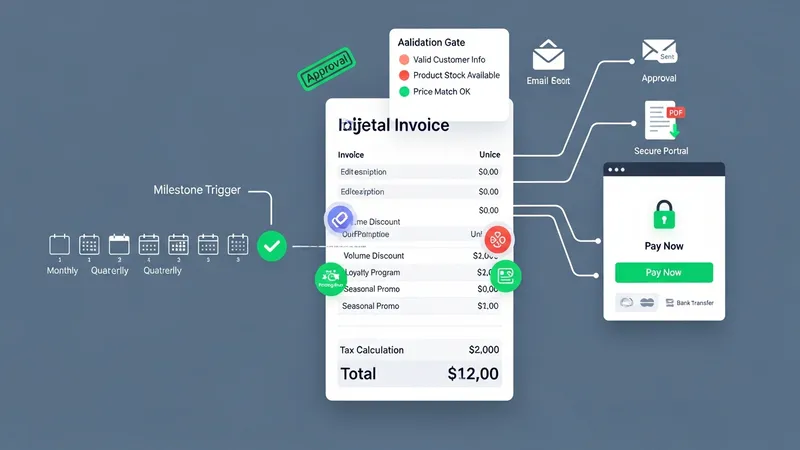
Invoice generation mechanics may combine templates with data mappings from order, project, or CRM systems. Templates typically define layout, standard terms, and required fields while data mappings populate line items, quantities, and unit prices. Validation layers can flag missing or inconsistent fields before dispatch. Where integration exists, invoice metadata may flow back into order records and accounting ledgers to maintain a single source of record. These flows often rely on APIs, webhooks, or batch data exports to synchronize systems.
Recurring billing setups can include options for billing frequency, proration, and trial periods, and they may support tiered pricing models. Billing schedules often include retry logic for failed payments and may generate dunning sequences to communicate unpaid balances. When subscriptions change mid-cycle, systems typically calculate prorated amounts and reflect them on subsequent invoices. Businesses may link recurring billing to customer ledger accounts to preserve historical balances and support collections workflows.
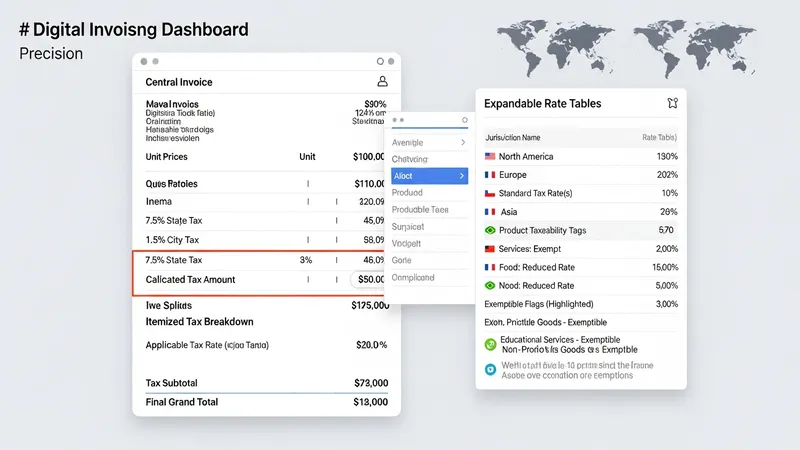
Tax calculation components often rely on configurable rule sets that map products and services to tax categories. A tax engine may reference geographic information, product classification, and exemptions to compute applicable taxes. Systems can support rounding rules, split tax responsibilities, and present tax breakdowns on invoices for clarity. For jurisdictions with reporting requirements, automated tools may produce summary reports or feed data to tax filing workflows, subject to local regulatory expectations.
Approval and accounts receivable processes can be incorporated into the automated flow to balance speed with oversight. Approval gates may require manual sign-off for large or atypical invoices, while lower-risk transactions proceed automatically. Automated posting to ledgers and reconciliation against payments can reduce manual accounting work but typically requires mapping and periodic review. Reporting functions often provide aging analyses, payment trends, and exception lists to help manage receivables and identify items needing intervention. The next sections examine practical components and considerations in more detail.
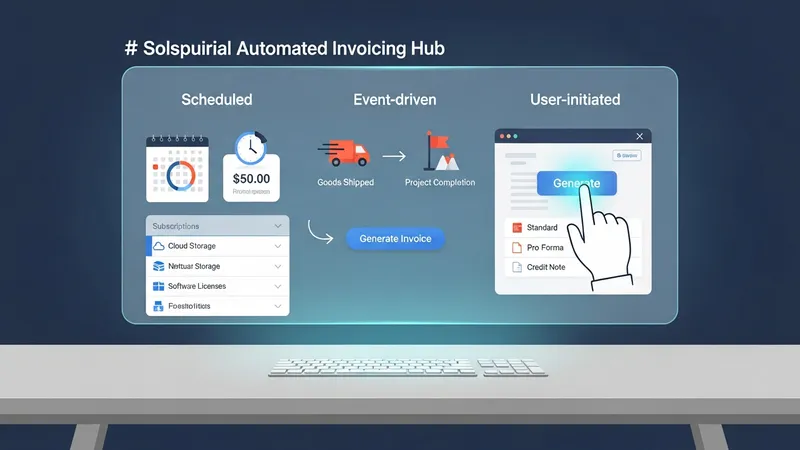
One category groups solutions by trigger type: scheduled, event-driven, and user-initiated. Scheduled generation executes on a fixed cadence and is common for subscription billing. Event-driven generation ties invoice creation to transactional events such as delivery confirmation or project milestone approval. User-initiated automation offers templated workflows that a user can launch with pre-filled data. Each method may integrate differently with upstream systems; choosing among them typically depends on the nature of revenue recognition and operational flows.
Template and formatting strategies often separate presentation from transactional data. Templates define how charges, taxes, and totals are displayed, while mappings pull in the specific values. This separation can support multi-language or multi-currency layouts in systems that require it. Support for conditional fields and line-level notes can help align invoices with contractual language. Systems that permit versioned templates may help maintain compliance as terms evolve without changing stored transactional data.
Data sources for automated invoicing usually include order management, subscription platforms, time-tracking systems, and CRM records. Mapping logic may transform source records into invoice line items and apply pricing rules. When time-based inputs are used, such as hours logged or consumption metrics, aggregation logic typically summarizes usage into billable units. Integration reliability is often a practical concern; systems may offer retries, logging, and reconciliation reports to ensure source-to-invoice consistency.
Selection criteria commonly considered when evaluating methods include compatibility with existing systems, support for regulatory requirements, and the ability to handle exceptions. Organizations often assess the ease of configuring rule sets, the availability of audit logs, and the granularity of controls for approvals. Practical considerations like expected invoice volume and the frequency of pricing changes can influence which generation methods are most appropriate. Continued monitoring and occasional rule adjustments may be required to keep automated rules aligned with business processes.
Recurring billing logic typically stores a schedule record for each customer or contract, including frequency, next billing date, and any proration rules. Systems may support common billing cycles such as monthly, quarterly, or annual, and can include options for trial periods and renewal notifications. Retry logic for failed payments and automated reminder sequences are often configurable. These features aim to reduce manual follow-up while ensuring customers receive consistent statements according to agreed terms.
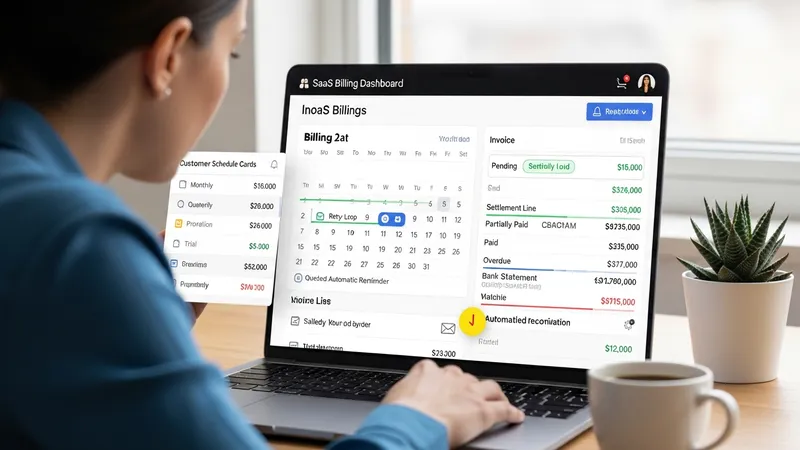
Payment tracking components attach settlement information to invoices once a payment is received or attempted. Status fields such as pending, partially paid, paid, or overdue are commonly used to manage lifecycle stages. Reconciliation tools may match incoming payments from bank statements or payment gateways to outstanding invoices using identifiers or amounts. Automated reconciliation can reduce manual ledger entry but often requires periodic review to resolve mismatches caused by partial payments or ambiguous remittance information.
Dunning and collections workflows can be automated to escalate outstanding balances over time. Typical sequences include a set of reminder notices with varying tone and content, and may culminate in referral to collections or a pause of service for recurrent billing arrangements. Systems may allow configurable intervals and content templates for each stage. These workflows commonly aim to balance timely collection with customer communication considerations and may integrate with CRM records to track outreach history.
Payment method support and gateway integration influence processing speed and reconciliation accuracy. Systems that include hosted payment pages or secure links can make settling invoices straightforward for recipients, while direct debit and ACH options may require additional setup. Gateway integrations typically expose transaction IDs and settlement dates that help link payments to invoices. When multiple payment methods are used, clear mapping rules and a centralized transaction ledger can assist in maintaining consistent accounts receivable records.
Tax calculation modules often rely on configured rate tables and product taxability rules. These modules may reference location data, product classifications, and exemption flags to determine applicable taxes. Systems can present a tax breakdown on invoices and produce summaries for reporting. Where tax rules change frequently, rule-based engines that allow updates without code changes are commonly used to reduce the need for engineering intervention and to maintain accuracy across regions or product types.
Compliance considerations include proper tax identification, supporting documentation for exemptions, and retention of invoice records for audit purposes. Automated systems may incorporate validation checks for required fields and generate audit trails that record who changed what and when. For jurisdictions with electronic invoicing mandates, systems can produce compliant formats or transmit invoices to government clearinghouses where required. These features tend to be important for organizations operating at scale or across multiple regulatory domains.
Accounting integration typically maps invoice records into general ledgers, revenue accounts, and tax liabilities. Automated posting can reduce duplicate entry but usually requires careful mapping between invoice fields and ledger accounts. Systems may support journal entry exports, real-time API posting, or batch file transfers to accounting packages. Periodic reconciliation between invoicing and accounting systems remains a common practice to confirm that recognized revenues and receivables align with invoiced amounts.
Practical considerations include handling currency conversion, rounding differences, and timing differences between invoice issuance and revenue recognition. When invoices cross accounting periods, teams may need to apply cut-off rules to ensure correct reporting. Implementing test scenarios and validation reports before full production rollout often helps identify mismatches. Ongoing review cycles can catch exceptions and provide data for tuning tax and accounting mappings.
Workflow automation connects invoicing steps with approval gates, role-based access, and exception handling. Typical flows allow low-risk invoices to proceed automatically while routing atypical or high-value invoices for review. Audit logs capture decision points and approver identities. Configurable thresholds and routing rules may be used to balance efficiency and control, and many systems provide interfaces for approvers to review supporting documents, add comments, and authorize issuance.
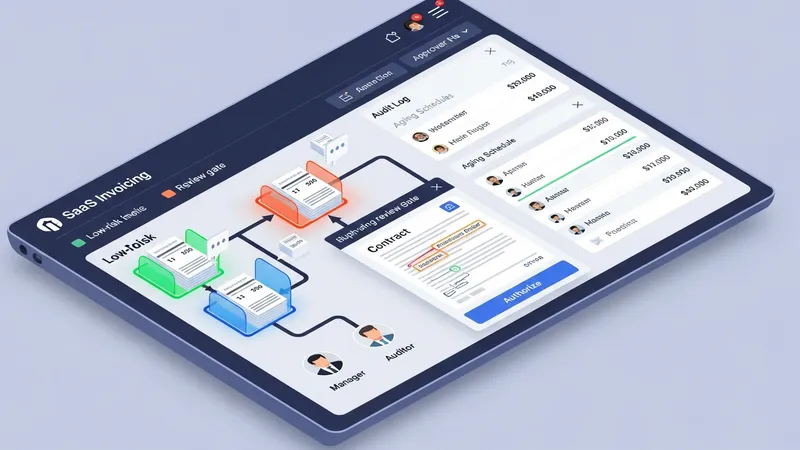
Reporting features typically include aging schedules, collections forecasts, and payment trend analyses. Dashboards may display key metrics like days sales outstanding (DSO) and receivables turnover, while exportable reports support deeper analysis. These outputs can help monitor cash flow patterns and identify accounts requiring attention. Reporting tools often allow filtering by customer, region, or service line to provide targeted visibility into receivable performance.
Accounts receivable management in automated systems can integrate customer communication, dispute tracking, and settlement logging. When disputes arise, invoice-level notes and status flags help preserve context for resolution. Systems may allow linking credits, adjustments, or refunds to original invoices and record the effects on ledger balances. Maintaining a single source for all receivable interactions is useful for consistent customer communication and audit readiness.
Operational tips often focus on gradual rollout, beginning with low-volume or low-complexity invoice types to validate mappings and workflows. Periodic reconciliation exercises and exception reporting can reveal configuration gaps. Stakeholder alignment, including finance, sales, and operations, typically helps ensure that automated rules reflect contractual terms and customer expectations. Continued monitoring and incremental updates may maintain accuracy as products and billing models evolve.