
Many organizations use automation to reduce repetitive work around their online presence and customer interactions. In the context of Google-related services and connected tools, automation typically involves linking profile management, messaging, booking, and reporting functions so routine activities run with minimal manual input. This approach often relies on application programming interfaces (APIs), scheduled scripts, event triggers, and third-party connectors to move data between systems, update business listings, and route customer messages. The aim is to make operational processes more consistent and to free human time for tasks that require judgment or personalized attention.
Technical implementations vary by scale and purpose. Small teams may use script-based automations that run at scheduled intervals, while larger operations may adopt event-driven integrations that respond in real time to profile changes, incoming messages, or new reviews. Common elements include authentication and permission handling, data mapping between systems, logging for auditability, and rules that control when and how actions execute. Planning typically emphasises maintainability and transparent error handling so that automated steps can be monitored and corrected when behaviours deviate from expectations.

When comparing integration approaches, it can be helpful to consider complexity, control, and maintenance. Connector platforms may reduce development time but can impose limits on customization and introduce subscription costs, whereas scripting offers fine-grained control at the cost of developer effort. Data flow design often maps business profile fields, customer messages, and appointment entries to internal records; this mapping should handle variations in input and preserve source timestamps. Teams frequently adopt a hybrid model where scripts manage bespoke logic and connectors handle standard transfers to third-party systems.
Automation frameworks commonly separate orchestration, transformation, and execution layers. Orchestration determines which sequence of steps to run, transformation converts data formats, and execution performs API calls or updates. This separation can make unit testing and incremental changes less risky. Logging and tracing are often treated as cross-cutting concerns so diagnostic information is available when outcomes differ from expectations. Access control is typically applied per layer so credentials for external systems are stored and rotated independently from orchestration logic.
Customer-facing automations usually prioritise safe handling of messages and reviews. Systems can route incoming messages to inboxes, send templated acknowledgements, or create internal tickets for follow-up. Review management workflows may flag content for human review before any public reply, and may archive review data for reporting. It is typical to maintain configurable thresholds so automated responses apply only in straightforward scenarios and escalate ambiguous or sensitive cases to staff. Audit trails often capture the automated action, the triggering event, and any manual edits that follow.
Reliability and error handling are central to operational automation. Common patterns include retry policies for transient API failures, dead-letter queues for messages that do not process, and scheduled health checks that validate external integrations. Observability tools and logs can surface trends such as increasing failure rates or slow API responses, which may indicate configuration drift or rate-limit issues. Teams often set conservative retry backoffs and limit concurrent execution to avoid cascading failures across linked systems.
Overall, automating Google-oriented business processes brings technical and organizational considerations: alignment of permissions, privacy controls, and monitoring expectations. Implementations can reduce repetitive work while requiring governance around data access and error remediation. The next sections examine practical components and considerations in more detail.
Integration choices commonly depend on the desired balance between speed of deployment and control over behavior. Visual connector platforms often enable non-developers to configure event-driven links between a business profile and systems such as customer relationship management or calendar services, while script-based solutions provide direct API access for customized transformations. Many implementations start with a small set of triggers — for example, new customer messages or profile updates — and expand as the team validates outcomes. Typical planning considers rate limits of APIs and how to handle data normalization across varying input formats.

Authentication patterns are a frequent practical detail. OAuth is commonly used for authorising access to Google APIs and third-party services, and token lifecycles must be managed to avoid unexpected expirations. When multiple systems are involved, teams may centralize credential storage with secret management services and grant scoped access to automation processes. This approach can reduce risk by limiting privileges, and it also supports auditing. Configuring refresh logic and monitoring token usage often prevents service interruptions in integrated workflows.
Event-driven versus scheduled execution is an architectural decision that can affect user experience. Real-time triggers may improve responsiveness for messaging and appointment confirmations, while scheduled syncs can consolidate updates to reduce API calls and simplify conflict resolution. Many organizations adopt a mix: event-driven actions for immediate customer interactions and scheduled jobs for bulk reconciliation or reporting. The chosen pattern typically reflects expected throughput and tolerance for eventual consistency between connected systems.
Considerations for maintainability include modular design and clear mapping documentation. Modular workflows let teams update or replace specific steps without affecting the entire sequence, and documenting data mappings helps onboard new maintainers or auditors. Monitoring integrations with synthetic transactions or health checks can signal when an endpoint has changed or when authentication requires attention. These practices may reduce downtime and make it easier to extend automation to additional business processes over time.
Routine tasks commonly automated include content updates, business hours adjustments, messaging acknowledgements, and basic triage of customer reviews. Automated content updates may pull canonical details from internal directories into public listings to keep contact information consistent. Messaging workflows often create ticket entries, attach context from the profile, and optionally respond with predefined messages for straightforward inquiries. Review triage can classify feedback by keywords and route items flagged as negative to a human reviewer. These patterns can reduce repetitive work while preserving human oversight for nuanced interactions.

Appointment and lead workflows typically map incoming requests to calendar events and CRM records. A frequent pattern involves parsing form submissions or messages, validating required fields, and creating preliminary records that staff can review. Automation can add contextual data, such as the profile location or previous interactions, to aid decision-making. Systems often include checks to avoid double bookings and to surface conflicts, and they may create follow-up reminders or status updates. Such automations are commonly designed to be reversible or editable by staff.
Content scheduling and publication is another commonly automated area. Businesses may automate the posting of updates or offers to multiple channels, using templates and localized content where needed. Automation can adapt timezone and locale information and apply consistent tagging for reporting. It is typical to include approval steps for content that affects public perception, so automated publication occurs only after a reviewer confirms messaging. This staged approach balances efficiency with safeguards against unintended public content.
Operational considerations often focus on accuracy and escalation. Automation may include validation rules that check for missing data fields or suspicious values, and these rules can trigger human review when thresholds are exceeded. Logging of automated actions enables post-hoc audits and supports rollback if incorrect updates are applied. Teams often set conservative automation scopes initially, expanding them as confidence in the logic grows, and they regularly review logs to spot recurring exceptions that may indicate upstream data quality issues.
Automations typically generate data that can inform operational decisions when collected and reported consistently. Key data points often include timestamps of triggers, status of executed steps, response latencies, and counts of successful versus failed actions. Aggregating these metrics into dashboards can reveal patterns such as peak message volumes or frequent API errors. Reporting frameworks frequently separate raw event logs from aggregated summaries so analysts can both diagnose specific incidents and observe long-term trends in automation performance.

Privacy and data minimization are relevant when automating user-facing interactions. Systems often limit stored personal data to what is necessary for resolution or reporting and implement retention policies to remove data after a defined period. When automation copies customer messages into internal systems, teams may apply redaction or hashing for sensitive fields. Compliance considerations typically advise documenting data flows and ensuring that any third-party processors involved in automation meet applicable privacy expectations and contractual requirements.
Monitoring and alerting strategies commonly include health checks, error-rate thresholds, and anomaly detection. Health checks may perform representative actions at scheduled intervals to confirm end-to-end functionality, while error-rate thresholds trigger investigation when failures exceed normal variability. Anomaly detection can surface unexpected spikes in failed API calls or processing time. Alerts usually direct information to appropriate operational teams and include contextual data such as recent logs and affected entities to accelerate diagnosis.
Data quality practices often accompany reporting implementations. Input validation, duplicate detection, and reconciliation jobs help maintain consistent records across systems. Reconciliation processes may compare counts between the source profile and the internal database to detect missing updates. Periodic reviews of transformation rules and mapping logic can prevent gradual divergence as external APIs evolve. These practices support reliable reporting and reduce the frequency of manual corrections that automation might otherwise propagate.
Access control is foundational for safe automation. Systems typically use role-based access control (RBAC) or scoped credentials so automated processes possess only the permissions required for their tasks. When multiple individuals and services interact with automation tools, least-privilege principles can limit the blast radius of compromised credentials. Credential rotation, centralized secret storage, and audit logs for credential use are often included as part of access management to support accountability and incident response.
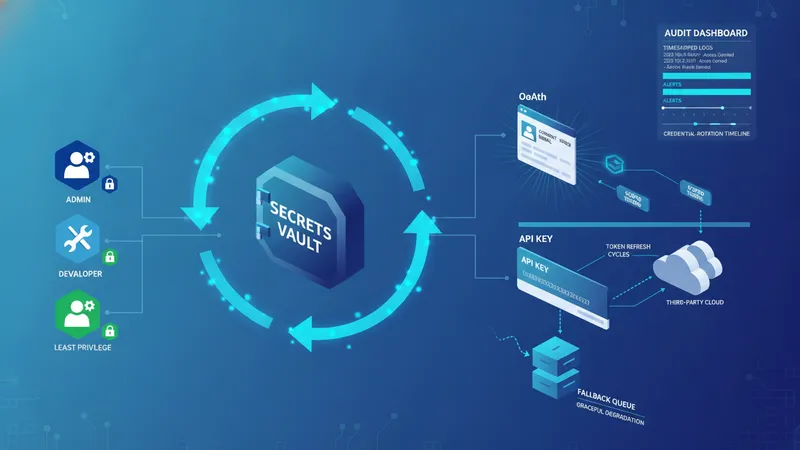
Third-party integrations commonly rely on OAuth or API keys; selecting the appropriate authentication method affects maintainability and security. OAuth often provides clear user consent flows and scoped access, while API keys may be easier to manage for machine-to-machine integrations. Teams frequently document each integration’s required scopes, expected rate limits, and error semantics so maintainers know how upstream changes might affect automation. Planning for token refresh and graceful degradation helps preserve basic functionality when an integration becomes temporarily unavailable.
Configuration and deployment practices can influence reliability. Infrastructure-as-code or version-controlled configuration for automation rules enables reproducible environments and rollbacks. Staging environments that mirror production help test automation changes against representative data without impacting live customer interactions. Change-management processes that include peer review and incremental rollouts often reduce the risk of unintended effects when altering automation logic or connectors.
Error handling and operational readiness are ongoing considerations. Implementations commonly include retry strategies, dead-letter handling for items that repeatedly fail, and dashboards that surface persistent failures. Escalation policies clarify when issues should move from automated recovery to human intervention. Documentation of common failure modes and standard remediation steps helps operational teams respond consistently and reduces mean time to recovery when automation behaves unexpectedly.