
Automation applied to the management and review of legal documents refers to using software-driven rules and structured processes to handle routine tasks across a document’s lifecycle. This includes capturing submitted paperwork, applying metadata, routing items to relevant reviewers, and enforcing standardized review steps. The objective is to reduce repetitive manual steps, increase consistency in how documents are handled, and make the status of files more visible to legal teams and stakeholders.
Such automation typically layers process logic on top of existing document repositories and communication channels. It can include form-based intake, conditional routing based on metadata, automated notifications, and staged approvals. These systems often integrate with search indexes and version controls so that users can find prior drafts, view change histories, and inspect who approved or rejected a step. The overall approach is procedural rather than prescriptive, and implementations may vary by firm size, practice area, and regulatory requirements.
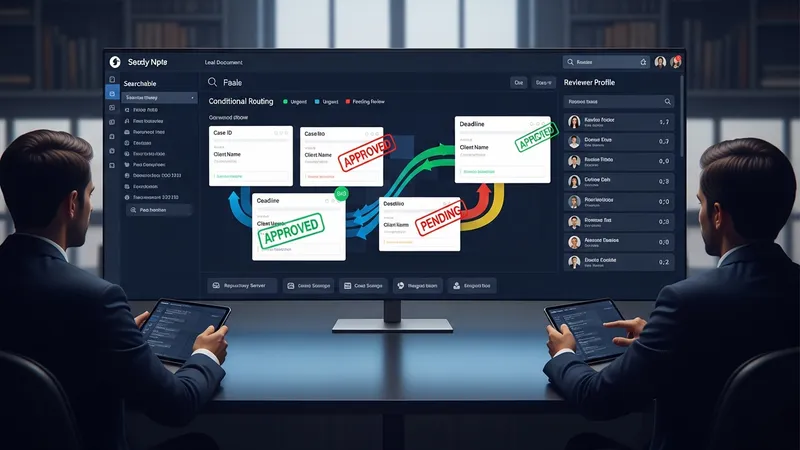
When comparing approaches, organizations often consider where automation will reduce time spent on repetitive tasks versus where human judgment is essential. For example, automating intake and metadata tagging can often cut manual classification work, while final legal review typically remains a human responsibility. Implementation frameworks commonly start with mapping existing manual steps, identifying decision points that can be codified, and piloting automation on a narrow set of document types. This phased approach may help teams measure effects on throughput and error rates before broader rollout.
Security and compliance are frequent considerations when automating legal document processes. Controls such as role-based access, audit logs, and encryption are often included to support confidentiality and chain-of-custody requirements. In regulated sectors, retention schedules and redaction capabilities may be integrated so that automation aligns with recordkeeping obligations. Teams typically document governance policies that describe permitted automation behaviors, who can change workflows, and how exceptions are handled to maintain accountability.
Integration with existing systems can influence the value and complexity of automation projects. Connectors to email, matter management, billing, or client portals may allow documents to flow with minimal manual intervention. Conversely, organizations sometimes encounter data silos or incompatible metadata schemas that require normalization work. Planning for integration often includes inventorying current repositories, defining canonical metadata fields, and specifying how external sources map into automated routing rules.
Measuring outcomes usually focuses on throughput and traceability rather than absolute claims of efficiency. Common metrics include cycle time for review, percentage of documents processed automatically, audit trail completeness, and frequency of rework due to version confusion. Teams often track these indicators over time to understand whether workflows are performing as intended and where tuning or retraining may be necessary. Observed gains in consistency can be context-dependent and may vary by document type and team practices.
In summary, automating legal document management and review consolidates routine capture, routing, and oversight tasks under rule-based and sometimes AI-augmented processes. Implementations often begin with targeted pilots, emphasize security and governance, and measure changes in cycle time and traceability. The next sections examine practical components and considerations in more detail.
Intake and routing define how incoming documents enter a legal workflow and arrive at the correct reviewers. Intake methods commonly include structured web forms, email ingestion, and scanned document capture with OCR. These capture steps often apply initial metadata—such as matter number, document type, or priority—that informs routing decisions. Conditional routing rules can forward documents to specific queues or teams based on metadata values or keyword matches. Organizations frequently pilot intake automation on a small set of templates or matter types to validate classification accuracy and routing logic before scaling.

Designing intake forms typically balances required fields against user convenience. Excessive required metadata can reduce compliance with submission standards, while too little metadata can increase downstream manual work. Systems often implement progressive disclosure, capturing minimal mandatory fields up front and prompting for richer metadata later in the workflow. Mapping common submission patterns can help define sensible defaults and reduce friction. These design choices may affect how reliably routing rules assign documents, and teams often measure initial error rates to guide refinements.
OCR and text extraction are commonly used for documents that arrive as images or scanned PDFs. Extracted text can be indexed for full-text search, used to populate metadata, or fed into classification models. Accuracy of extraction may vary by source materials and scan quality, so verification steps or human-in-the-loop checks are often included for critical document categories. When text extraction feeds automated routing, teams may set conservative thresholds for automated classification and route lower-confidence items to a human queue to prevent misrouting.
Routing logic can include escalation and exception handling to manage unusual cases. For example, if assigned reviewers are unavailable, rules may escalate items to backup reviewers or managers. Workflow engines often log routing decisions and reasons for exceptions to support audits and process improvements. Teams typically document routing criteria and maintain mapping tables so changes to organizational structure or practice area responsibilities can be reflected in routing configurations without disrupting ongoing operations.
Automated review and approval sequences define how documents move through assessment, commentary, and sign-off stages. Workflows may include parallel or sequential review paths, configured timeboxes for reviewer response, and role-based approval gates. For document markup, integration with redlining and comparison tools helps maintain a clear history of edits. Systems commonly track who made each change, when, and which version was approved. This metadata supports accountability and can simplify later inquiries about negotiation histories or approval rationales.
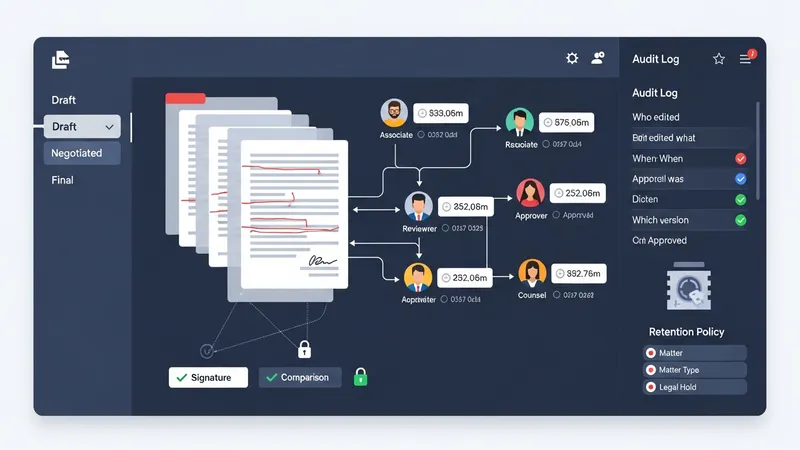
Version control strategies often combine immutable audit logs with managed draft versions. Some implementations maintain a single canonical file with tracked changes, while others store discrete versions for major milestones such as draft, negotiated, and final. Retention policies applied to versioned documents may vary based on matter type or regulatory requirements. Teams commonly define retention and archival rules up front so that automated pruning or long-term storage aligns with legal hold obligations and reduces unnecessary repository growth.
Approval routing can include conditional steps based on content or monetary thresholds. For instance, contracts exceeding a certain limit may be routed to senior counsel or a finance reviewer. These conditional approvals are codified in workflow rules and often accompanied by required fields or checklists to ensure that approvers have necessary context. Automated reminders and escalation paths can reduce bottlenecks, but organizations typically avoid fully automating discretionary legal judgments and instead surface context to human approvers for final decisions.
Collaboration features that support annotated feedback and consolidated comment threads may reduce version proliferation. Centralized comment capture can make it easier to reconcile reviewer feedback rather than exchanging multiple email attachments. However, teams should consider user training and standardized annotation practices so that comments remain actionable and traceable. Periodic reviews of version growth and review cycle times help identify opportunities to simplify review steps or adjust approval thresholds to balance thoroughness with efficiency.
Effective search and notification mechanisms are central to managing document workflows. Search may combine full-text indexing with structured metadata queries to return relevant documents quickly. Configurable notification channels—such as email alerts, in-application messages, or integrations with collaboration platforms—inform reviewers about assignments, deadlines, and status changes. Teams often tune notification frequency and format to avoid alert fatigue while preserving timely awareness of pending actions and escalations.

Tracking functionality frequently includes dashboards and reports that display key performance indicators such as average review time, number of documents in each stage, and counts of exceptions. These dashboards may support filters by matter, practice area, or document type so managers can investigate workflow bottlenecks. Tracking data is often used for continuous improvement: identifying recurring delays, adjusting workload distribution, or refining routing rules. Metrics are typically interpreted cautiously, recognizing that complex matters may naturally take longer to resolve.
Indexing and search quality depend on consistent metadata and normalization practices. Establishing canonical values for fields such as document type, jurisdiction, or client name supports reliable query results. Controlled vocabularies and dropdown selections in intake forms help maintain data quality. Where legacy repositories lack consistent metadata, projects may include a remediation phase to tag or reclassify prior documents so that search and analytics produce more accurate results across the corpus.
Notifications and tracking systems should include audit-friendly records for compliance and dispute resolution. Recording when notifications were sent, who opened documents, and timestamps for progress helps reconstruct timelines. In some contexts, retention of such interaction logs may be subject to legal hold or privacy rules, so governance policies often define what logs are preserved and for how long. Teams commonly review these policies with legal and compliance stakeholders before enabling comprehensive tracking features.
Designing automation requires aligning technical capabilities with legal and organizational governance. Effective designs often start with a process map that identifies decision points, required metadata, and exception pathways. Stakeholders from legal, IT, and operations typically collaborate to prioritize document types for automation based on volume and repeatability. Pilot projects can surface integration challenges and user experience issues before enterprise-wide adoption, and they may include performance measurements to inform wider rollout decisions.

Integration considerations commonly involve connectors to existing document repositories, matter management systems, identity providers, and communication platforms. Authentication, single sign-on, and access controls are central to maintaining security across integrated systems. Data mapping between systems—defining how fields correspond and how IDs are synchronized—often requires careful planning to prevent duplication or loss of contextual information. Where APIs are available, automation engines can orchestrate document flows while preserving metadata fidelity.
Governance frameworks typically specify who may create or modify workflows, how exceptions are handled, and how changes are tested. Versioning for workflow definitions themselves is often used so administrators can revert to prior configurations if unintended behavior occurs. Policies may include periodic review cycles, change request processes, and logging requirements for audit purposes. Clarifying these elements before broad deployment helps preserve legal oversight and reduces operational risk as automation scales.
Adoption and change management are practical considerations that influence outcomes. Training materials, role-based guides, and gradual transitions help users adapt to new intake and review processes. Measurement plans that track usage patterns, error rates, and time savings can inform iterative improvements. Organizations often supplement technical rollout with governance checklists and periodic stakeholder reviews to ensure that the automation continues to align with evolving practice needs and compliance expectations.